
Marcus Okafor managed cold outreach for a fintech SaaS company. On a Tuesday morning he loaded 2,800 contacts into a new campaign sequence — a list his team had bought three months prior and never re-verified. By Friday, the bounce report showed 11.4%. He didn’t know whether that was a soft bounce problem, a hard bounce problem, or both. He didn’t know which type was more urgent. And he had no idea his sending domain was already being throttled by Gmail before he even looked at the report.
That confusion is common. Most email marketers know bounce rates matter, but few understand how hard bounces and soft bounces differ in what they signal, how fast they damage your reputation, and what the correct response to each actually is.
This guide covers both types with precision — what causes them, what they cost you, and exactly what to do when you see them.
Hard Bounce vs Soft Bounce: The Direct Answer
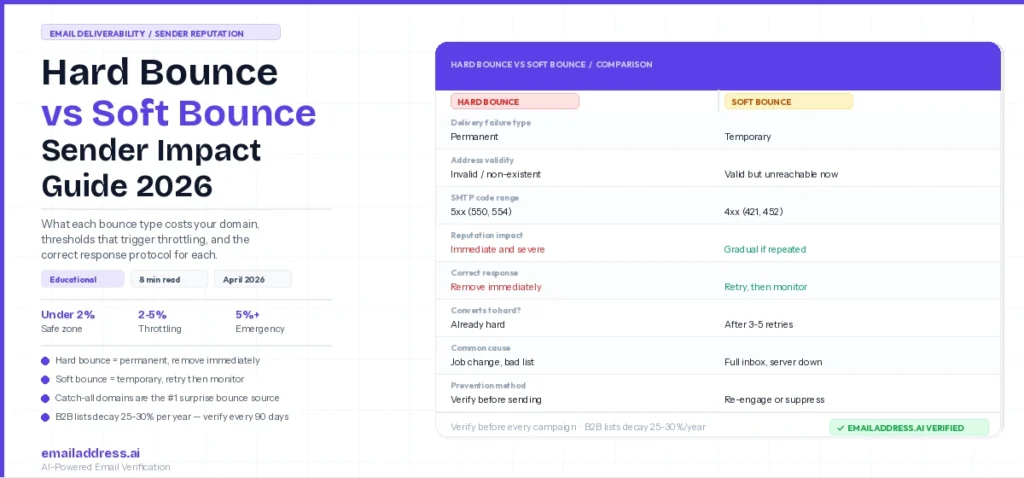
A hard bounce is a permanent email delivery failure. The receiving server rejects the message because the address does not exist, the domain is inactive, or the sender’s IP or domain has been blocked. Hard bounces require immediate removal from every list and sequence. A soft bounce is a temporary delivery failure. The address exists and the mailbox is valid, but something prevented delivery at that moment — a full inbox, a server timeout, or a message size rejection. Soft bounces warrant monitoring and retry, not immediate removal.
Both types damage your sender reputation, but at different speeds and through different mechanisms. Because of that, each type needs a different response protocol.
What Causes a Hard Bounce
Hard bounces happen because the email address or domain cannot accept mail permanently. The four main causes are:
- Invalid or non-existent address: the address was never valid, has been deactivated, or contains a typo. When a contact leaves a company, their employer-issued email address typically deactivates within days. B2B lists decay at roughly 25-30% per year because of this.
- Inactive domain: the domain in the email address no longer exists or has expired. This happens when companies shut down, rebrand, or migrate to new domains.
- Domain or IP block: the receiving mail server has explicitly blocked your sending domain or IP. This usually signals a reputation problem on your end rather than an address problem on theirs.
- Spam trap hits: you have sent to an address maintained specifically to identify senders using unverified or purchased lists. Hitting a spam trap does not always generate a bounce code, but when it does, the server permanently rejects delivery.
The SMTP response codes for hard bounces typically fall in the 5xx range. A 550 error means “user unknown” — the address does not exist. A 554 error usually means the message was rejected at the policy level, often due to a reputation block. Both require the same response: remove the address immediately.
What Causes a Soft Bounce
Soft bounces happen because of temporary conditions that prevent delivery to an address that does otherwise exist. Common causes include:
- Full inbox: the recipient’s mailbox has hit its storage limit. This is common for abandoned accounts or providers with small storage quotas.
- Server temporarily unavailable: the receiving mail server was down or unreachable at the time of send. A retry within 24-48 hours often delivers successfully.
- Message too large: your email exceeded the receiving server’s size limit. This is less common for text-based campaigns but applies to image-heavy sends.
- Content filtering rejection: the receiving server’s spam filter temporarily rejected the message based on content signals. This is a 4xx response and may resolve on retry, but persistent content-based rejections suggest a sending reputation or content problem.
- Greylisting: some mail servers temporarily reject first-time senders and accept them on retry. This is a security feature, not a signal of list quality problems.
Soft bounce SMTP codes fall in the 4xx range. A 421 means the service is temporarily unavailable. A 452 means the mailbox is over quota. These codes tell you to retry, not to remove.
How Each Type Damages Your Sender Reputation
This is the part most guides skip. Hard bounces and soft bounces don’t just affect your bounce rate metric — they each trigger different responses from inbox providers, and understanding those responses determines how urgently you need to act.
What Hard Bounces Cost You
Each hard bounce signals to Gmail, Outlook, and Yahoo that you are sending to addresses you haven’t verified. Inbox providers track this at the domain level. When your hard bounce rate climbs above 2%, most major providers start applying delivery deferral — meaning future emails from your domain land in spam or get blocked at the gateway, even when sent to valid, engaged recipients.
Google’s bulk sender guidelines, updated in 2024, explicitly flag persistent hard bounce rates above 2% as grounds for domain-level blocking. Yahoo has implemented similar thresholds. Microsoft’s Outlook uses its own composite reputation score, but hard bounces factor heavily into it.
The damage compounds fast. A single campaign with an 8% hard bounce rate doesn’t just hurt that campaign — it tags your sending domain with negative reputation signals that affect every subsequent send for weeks or months. Marcus’s 11.4% bounce rate on Tuesday meant his sales team’s one-to-one emails from the same domain were landing in spam by Thursday, even though those were to confirmed prospects who had never bounced.
The threshold that triggers immediate action:
| Hard Bounce Rate | What Inbox Providers Do | Required Action |
|---|---|---|
| Under 0.5% | No action — healthy range | Continue regular list hygiene |
| 0.5% – 2% | Caution — monitoring begins | Audit list source, re-verify segment |
| 2% – 5% | Throttling and deferral starts | Pause campaigns, verify entire list |
| Above 5% | Domain blocking risk | Stop all sends immediately, full audit |
What Soft Bounces Cost You
Soft bounces are less immediately damaging, but they carry a hidden cost that many senders ignore. A single soft bounce on a given address is not a problem. However, if your ESP logs repeated soft bounces to the same addresses across multiple sends, those addresses accumulate negative signals. Most ESPs will automatically reclassify a repeatedly soft-bouncing address as a hard bounce after 3-7 consecutive soft bounce events.
The second soft bounce cost is engagement dilution. Every email you send to a full, unreachable inbox is an email that generates zero opens, clicks, or replies. When inbox providers evaluate your sender reputation, they weigh positive engagement signals (opens, replies, moves from spam to inbox) against negative signals (bounces, spam complaints, no engagement). Soft bounces to consistently unreachable inboxes drag down your engagement rate even though they don’t generate a hard failure code.
The practical threshold for soft bounces: if the same address generates soft bounces across 3 or more consecutive sends, treat it as a hard bounce and remove it.
Verify Before You Hit Send
EmailAddress.ai catches hard bounce risk before it reaches your ESP — flagging invalid addresses, inactive domains, and catch-all patterns that standard verification misses. Upload your list and get a full deliverability report before your next campaign. Start verifying free at EmailAddress.ai.
The Response Protocol for Each Bounce Type
Different bounce types need different responses. Applying the same action to both is how senders either lose recoverable addresses or keep damaging ones in rotation.
Hard Bounce Response: Remove Immediately, No Exceptions
When an address generates a hard bounce, remove it from every list and every sequence within 24 hours. Do not move it to a “re-verify later” folder. Do not retry the send. The address is either invalid or your domain is blocked at that server — neither condition resolves by waiting.
After removing hard bounces, run this audit:
- Where did this address come from? If from a purchased or scraped list, audit the entire batch from that source
- When was it last independently verified? If over 90 days ago, re-verify the full list before the next send
- Is the hard bounce rate above 2%? If yes, pause all campaigns from that sending domain until the list is clean
- Check Google Postmaster Tools for your domain’s reputation score — it will show you whether inbox providers have already started throttling your sends
Soft Bounce Response: Retry Once, Then Monitor
When an address generates a soft bounce, most ESPs automatically retry delivery within 24-72 hours. Let that retry happen. If the second attempt delivers, the address stays in your list with no action required.
If the address continues soft-bouncing, follow this escalation:
- After 3 consecutive soft bounces: flag the address for review and exclude from the next campaign send
- After 5 consecutive soft bounces: treat as a hard bounce and remove permanently
- If soft bounce rate exceeds 5% of a send: investigate whether a content filter or authentication issue is driving rejections — check your SPF, DKIM, and DMARC configuration before your next send
Why Verification Prevents Hard Bounces Before They Happen
The most effective way to keep hard bounce rates near zero is to verify email addresses before they enter your CRM or campaign sequence. After-the-fact bounce management is damage control. Pre-send verification is prevention.
A proper email verification check runs through five layers:
- Syntax check: confirms the address is formatted correctly (has @, valid domain, no illegal characters)
- Domain and MX record check: confirms the domain exists and has active mail exchange records — a domain with no MX record cannot receive any email
- SMTP verification: pings the receiving mail server to confirm the mailbox accepts mail, without actually sending a message
- Catch-all detection: identifies domains that accept all mail regardless of whether the specific address exists — a critical step that most basic verifiers skip
- Spam trap detection: flags addresses associated with known honeypot addresses or spam listed patterns
Catch-all detection deserves special attention because it is the step that prevents the most surprising hard bounces. A catch-all domain accepts all SMTP pings as valid — so without this check, an address at a catch-all domain passes verification but then hard-bounces in your live campaign. According to EmailAddress.ai’s verification dataset, HCP email lists without catch-all classification produce hard bounce rates 2.4x higher than the same lists run through catch-all detection. The same pattern appears in B2B SaaS, legal, and financial services lists where corporate domains frequently configure catch-all settings.
Catch-All Detection That Actually Works
EmailAddress.ai uses AI-powered catch-all classification to distinguish genuine deliverable addresses from false positives at catch-all domains. See how it handles the addresses that standard verifiers mark as “unknown” in the complete catch-all verification guide.
What Happened With Marcus’s Campaign
When Marcus finally pulled the bounce breakdown from his ESP, the picture became clear. Of his 11.4% total bounce rate, 8.9% were hard bounces — addresses that no longer existed at their listed domains. Most of the invalid addresses belonged to contacts who had changed jobs in the three months since the list was bought. A few were at domains that had shut down entirely. The remaining 2.5% were soft bounces, mostly full inboxes, which his ESP was already retrying.
The hard bounces were the emergency. He removed all 249 hard-bounced addresses immediately, paused the campaign, and ran the remaining 2,551 contacts through email verification. Verification flagged a further 340 as high-risk or catch-all, which he moved into a separate monitored segment rather than the primary sequence.
By the following Tuesday, Gmail’s Postmaster Tools showed his domain reputation recovering. The throttling eased after three days of clean sends to the verified segment. Total recovery time: just under two weeks. Because he understood the difference between the bounce types, he knew which addresses to remove, which to monitor, and which to retry — instead of deleting everything or ignoring the problem.
Frequently Asked Questions
What is the difference between a hard bounce and a soft bounce?
A hard bounce is a permanent delivery failure caused by an invalid address, an inactive domain, or a policy block at the receiving server. A soft bounce is a temporary delivery failure caused by conditions like a full inbox, a server timeout, or a message size issue. Hard bounces require immediate permanent removal from your list. Soft bounces warrant monitoring and retry, with removal only after repeated failures to the same address.
How does a hard bounce affect sender reputation?
Hard bounces damage sender reputation by signaling to inbox providers like Gmail, Outlook, and Yahoo that you are sending to unverified or decayed contact lists. When hard bounce rates exceed 2%, most major inbox providers begin deferring or blocking delivery from your sending domain. That damage applies to all future sends from that domain, including one-to-one sales emails, not just campaign sends.
What is an acceptable hard bounce rate in 2026?
An acceptable hard bounce rate in 2026 is below 0.5% for most B2B email programs. A rate between 0.5% and 2% is a caution zone that warrants list investigation. Above 2%, inbox providers begin applying throttling and delivery deferral. Above 5% is a sending emergency that requires pausing all campaigns and conducting a full list audit before resuming.
Can a soft bounce become a hard bounce?
Yes. Most ESPs automatically reclassify an address as a hard bounce after 3-7 consecutive soft bounce events. This happens because persistent soft bouncing to the same address indicates the mailbox is abandoned, over quota indefinitely, or the recipient is no longer actively using that address. Once reclassified as a hard bounce, the address should be removed permanently from all lists and sequences.
Does email verification prevent hard bounces?
Yes. Pre-send email verification prevents hard bounces by identifying invalid addresses, inactive domains, and catch-all domains before any email is sent. Verification runs syntax, domain, MX record, SMTP, and catch-all checks that catch the addresses most likely to generate hard bounces in live sends. Lists verified within 90 days before a campaign deploy produce materially lower hard bounce rates than unverified or stale-verified lists.
What is a catch-all email address and does it cause hard bounces?
A catch-all email address is one hosted on a domain configured to accept all incoming mail, regardless of whether the specific mailbox exists. Standard SMTP verification passes these addresses as valid because the server responds positively to any address at that domain. But in a live campaign, many catch-all addresses hard-bounce because the individual mailbox does not actually exist. Catch-all detection is a separate verification step that identifies this pattern and flags those addresses before they enter a live send.
Key Takeaways
- Hard bounces are permanent failures — remove the address immediately and never retry
- Soft bounces are temporary failures — retry once, then monitor and escalate to removal after 3-5 consecutive soft bounce events
- Hard bounce rates above 2% trigger throttling and delivery deferral from Gmail, Outlook, and Yahoo — treat this as a sending emergency
- Soft bounces damage reputation indirectly by dragging down engagement rates and eventually converting to hard bounces if left in rotation
- Catch-all detection is the most commonly skipped verification step — and the one responsible for the most surprising hard bounce spikes in live campaigns
- B2B email lists decay at roughly 25-30% per year — a list that was clean 90 days ago may already have meaningful hard bounce risk if it has not been re-verified
Stop Hard Bounces Before They Hit Your Domain
EmailAddress.ai verifies your list with AI-powered catch-all detection, SMTP verification, and spam trap screening. Upload your contacts and get a full bounce risk report before your next campaign deploys. Verify My List Free