
COMMERCIAL / TECHNICAL / 9 MIN READ
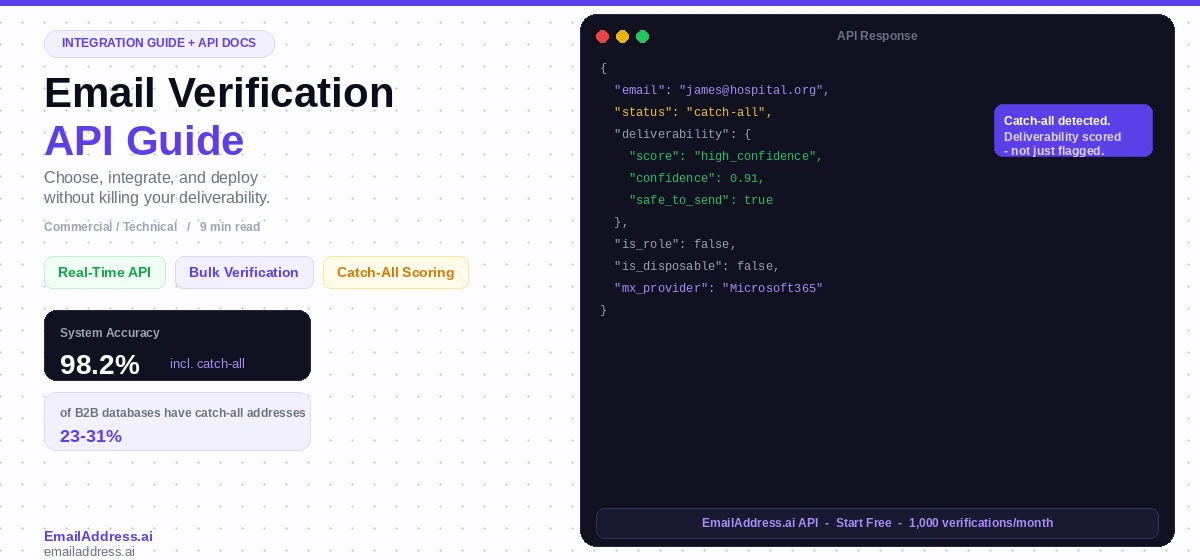
Your form is collecting email addresses. And your CRM is storing them. Plus your campaigns are sending to them. And somewhere in that chain, bad addresses are slipping through – ones that look valid but bounce on delivery, ones that belong to domains that accept everything, ones that haven’t been a real inbox for eight months. An email verification API solves this at the source.
An email verification API is an interface that validates email addresses programmatically – in real time, at scale, or in batch – checking whether an address is syntactically valid, whether the domain has an active mail server, and whether the specific mailbox is deliverable. The API returns a result (valid, invalid, risky, catch-all, or disposable) that your application, CRM, or marketing automation platform can act on immediately.
This guide is for both the developer integrating the API and the marketing or RevOps lead who needs to understand what the API should actually catch – because most email verification APIs have a significant gap that doesn’t show up in the feature list.
In This Guide
- What an Email Verification API Does (and What It Doesn’t)
- Real-Time vs. Bulk API Verification: When to Use Each
- The Five Things Your Verification API Should Return
- The Catch-All Gap: Why Most APIs Get This Wrong
- How to Integrate an Email Verification API: Key Touchpoints
- Choosing an Email Verification API: Evaluation Criteria
- EmailAddress.ai API: What Makes It Different
- Frequently Asked Questions
What an Email Verification API Does (and What It Doesn’t)
A standard email verification API checks three things in sequence: format validity (does the address follow standard email syntax), domain health (does the domain have an active MX record and a functioning mail server), and mailbox existence (does the specific address exist at that domain, confirmed via SMTP handshake without sending an email).
What it does well:
- Catches obvious invalid formats (missing @, invalid TLD, double dots)
- Identifies domains with no mail server – a hard signal of an invalid address
- Confirms mailbox existence at most standard email providers (Google Workspace, Microsoft 365, standard IMAP servers)
- Identifies known disposable email domains (Mailinator, Guerrilla Mail, 10-minute mail services)
- Flags known role-based addresses (info@, admin@, support@) that should not be added to personal outreach lists
What it misses:
- Catch-all domains. When a domain is configured to accept all inbound email regardless of whether the mailbox exists, the SMTP handshake returns “valid” for every address at that domain – including ones that don’t correspond to a real person. Most standard APIs return “catch-all” as a status and leave the deliverability decision to you. That’s not enough.
- Recently deactivated addresses. An address that was valid three months ago may have been deactivated when an employee left. The domain is still active, the SMTP handshake may still return success (some servers don’t immediately drop retired mailboxes), but the address will hard-bounce on delivery.
- Gray-zone deliverability. Some addresses pass every verification check but consistently underperform on engagement metrics – shared inboxes, alias addresses that forward to an unmanned account, or addresses at companies with aggressive spam filtering that silently discards commercial email.
Real-Time vs. Bulk API Verification: When to Use Each
Email verification APIs operate in two primary modes. Choosing the wrong mode for a given use case either slows your application unnecessarily or lets bad data accumulate between verification cycles.
Real-Time API Verification
Real-time verification runs at the point of data capture – a form submission, a CRM record creation, a sign-up flow. The API receives the address, validates it, and returns a result in under 500ms. Your application uses the result to either accept the address, prompt the user to correct it, or flag it for manual review.
Use real-time verification for:
- Website and landing page form submissions
- CRM lead creation from any inbound source
- E-commerce account registration
- Newsletter signup flows
- Any touchpoint where a user is entering their own email address
Bulk API Verification
Bulk verification processes large lists asynchronously – you submit a file or array of addresses via API, the system processes them in parallel, and you retrieve results via webhook or polling once complete. Response times depend on list size and provider infrastructure; quality providers process 100,000 addresses in under 10 minutes.
Use bulk verification for:
- Pre-campaign list hygiene before any major email send
- Onboarding newly purchased or licensed contact data
- Quarterly CRM database hygiene runs
- Re-verification of list segments dormant for 90+ days
- Verifying HCP or B2B lists where catch-all prevalence is high
| Mode | Trigger | Response Time | Best For |
|---|---|---|---|
| Real-Time | Single address, on-submit | <500ms | Forms, CRM creation, signups |
| Bulk | List upload or array submission | Minutes (async) | Pre-campaign hygiene, CRM refresh |
The Five Things Your Verification API Should Return
Not all verification APIs return the same result structure. The minimum useful response for any B2B or marketing use case includes these five fields. If your current provider doesn’t return all five, you’re making send decisions with incomplete information.
01
Deliverability Status
Valid / Invalid / Risky / Catch-all / Disposable. The primary classification that drives your accept/reject logic.
02
Catch-All Classification
Whether the domain is a catch-all and, critically, the estimated deliverability of this specific address at that catch-all domain.
03
Role Address Flag
Whether the address is a role-based inbox (info@, sales@, admin@). These should not go into personal outreach sequences.
04
Disposable Domain Flag
Whether the domain is a known disposable email provider. Critical for blocking fake signups and trial abuse.
05
MX Record Details
The mail exchange records for the domain. Helps identify provider (Google, Microsoft, custom) and domain health signals.
The Catch-All Gap: Why Most APIs Get This Wrong
Every serious email verification API returns a catch-all flag. Almost none of them tell you what to do with it. The standard response for a catch-all address is a status of “catch-all” or “accept-all” – and then it’s your problem. The API has told you the domain catches all email, but it can’t tell you whether the specific address you’re looking at will actually deliver.
This is the gap that creates the worst bounce rate outcomes in B2B email programs. A company uses a verification API, sees that addresses are returning “catch-all” status, and either sends to all of them (producing high bounce rates) or suppresses all of them (removing a significant portion of their B2B list unnecessarily). Neither approach is correct.
The right answer is catch-all deliverability scoring: a probabilistic assessment of whether this specific address at this catch-all domain will deliver, based on historical send data, domain behavior patterns, and AI-driven inference. EmailAddress.ai’s catch-all verification does exactly this – scoring each catch-all address as High Confidence Deliverable, Uncertain, or High Confidence Undeliverable rather than returning a blanket “catch-all” flag that leaves the decision to chance.
The Catch-All Scale of the Problem
EmailAddress.ai’s processing data shows that 23-31% of B2B email databases contain catch-all addresses. For healthcare and enterprise B2B lists, this proportion is higher – often 40-50% – because hospitals, universities, and large enterprises commonly run catch-all configurations. If your API is returning these as simply “catch-all” with no deliverability guidance, you’re flying blind on a substantial portion of every list you verify.
See the API that classifies catch-all deliverability
EmailAddress.ai goes beyond the “catch-all” flag to give you an actionable deliverability score for every address. View the API docs or start free.
View API DocsLearn About Catch-All
How to Integrate an Email Verification API: Key Touchpoints
Where you place API verification in your stack determines how much bad data you prevent versus how much you have to clean up retroactively. These are the four integration touchpoints that make the biggest difference.
1. Form Submission (Real-Time)
Call the verification API on the server side when a user submits a form containing an email field. On “invalid” result, return a user-facing error before the form submits. On “risky” or “catch-all”, you can either allow submission and flag the record internally, or prompt the user to confirm their address. Never call the API client-side with your API key exposed in the browser – always route through your backend.
2. CRM Record Creation (Real-Time or Near-Real-Time)
Trigger a verification API call whenever a new contact is created in your CRM, regardless of the source. Use a webhook or CRM workflow trigger. Write the verification result back to a custom field on the contact record (e.g., “Email Deliverability Status”). This gives your sales and marketing teams visibility into which contacts are safe to email before they hit a sequence.
3. Pre-Send Batch Verification
Before any major campaign send, run the target list through bulk API verification. Filter out invalid and high-bounce-risk addresses before the campaign fires. This is especially important for lists where a segment hasn’t been mailed in 90+ days – those addresses have had time to decay significantly. Build this into your campaign launch checklist as a mandatory step.
4. Scheduled CRM Hygiene (Bulk, Recurring)
Set up a quarterly automated job that pulls all active contacts from your CRM, submits them to the bulk verification API, and writes updated deliverability statuses back to each record. Any contact that moves from “valid” to “invalid” or “high bounce risk” gets suppressed from future campaign sends automatically. This prevents decay from accumulating silently between campaign sends.
Choosing an Email Verification API: Evaluation Criteria
The market for email verification APIs includes dozens of providers, from large platforms to smaller specialists. These are the criteria that separate a verification API that protects your sender reputation from one that gives you false confidence.
Catch-All Handling Quality
Ask the provider directly: what happens when an address is at a catch-all domain? Do they return a binary “catch-all” flag or a deliverability score? A binary flag is the baseline minimum. A scored classification is the standard you should hold providers to if your list contains meaningful B2B or HCP contacts.
Documented Accuracy Rate
Ask for a documented accuracy rate – and ask how it is calculated. The honest answer involves showing you the false positive rate (addresses the API calls valid that actually bounce) and the false negative rate (addresses the API suppresses that would have delivered). An overall accuracy number without false positive/negative breakdown tells you very little.
API Response Speed (Real-Time Mode)
For real-time form verification, API response time directly affects user experience. Under 300ms is good. Under 500ms is acceptable. Over 1 second will noticeably slow your form submission and is a red flag for production use. Test response times from your server’s geographic region, not just from the provider’s stated average.
Free Tier and Trial Options
Any credible verification API provider offers a free tier or a meaningful free trial. Run your own test list through it – ideally a sample that includes known valid addresses, known invalid addresses, and a set of catch-all domain addresses you can verify against actual send outcomes. The provider that scores your catch-all addresses most accurately on your own data wins.
EmailAddress.ai API: What Makes It Different
EmailAddress.ai is an AI-powered email verification platform built specifically for the catch-all problem that standard verification APIs leave unresolved. The API covers all standard verification checks – syntax, domain, SMTP mailbox confirmation, disposable domain detection, role address flagging – and adds a proprietary catch-all deliverability classification layer that no SMTP-only approach can replicate.
Key API capabilities:
- Real-time single-address verification with sub-300ms average response time for standard addresses
- Bulk verification API for list hygiene at scale – processes 100,000 addresses with full catch-all classification
- Catch-all deliverability scoring – High Confidence Deliverable, Uncertain, High Confidence Undeliverable – not a binary flag
- 98.2% overall accuracy across all verification categories including catch-all classification
- HCP-specific catch-all handling for healthcare and pharmaceutical email programs where hospital domain catch-all prevalence is highest
- Webhook support for asynchronous bulk job completion notification
- Native integrations with major CRM and marketing automation platforms
The EmailAddress.ai API is documented at the API docs page with full endpoint reference, authentication instructions, response schema, error codes, and code examples in Python, Node.js, and cURL. A free tier is available with 1,000 verifications per month – no credit card required to start.
For teams running B2B data licensing programs or HCP outreach at scale, EmailAddress.ai also offers a B2B data licensing solution that combines verified contact data delivery with ongoing email verification – so your licensed records are re-validated on a regular cycle rather than degrading silently between purchases.
Start verifying. Free for your first 1,000 addresses.
Real-time and bulk API. Catch-all scoring. HCP-specific verification. No credit card required to start.Start FreeView API Docs
Frequently Asked Questions
What is an email verification API?
An email verification API is a programmatic interface that validates whether an email address is real and deliverable, without sending an email. It checks syntax validity, domain health (MX records and DNS), and mailbox existence via SMTP handshake. Quality APIs also identify catch-all domains, disposable email services, and role-based addresses. The API returns a structured result that your application, CRM, or marketing platform can use to accept, reject, or flag addresses at the point of capture or before a campaign send.
How does email validation API work?
Email validation APIs work in three sequential steps: first, they check that the address follows valid email syntax (correct format, valid TLD, no invalid characters). Second, they verify the domain has an active mail exchange record – confirming a mail server exists. Third, they initiate an SMTP handshake with the mail server to confirm whether the specific mailbox exists, without actually delivering an email. Catch-all domains accept any SMTP handshake regardless of mailbox existence, which is why advanced APIs layer additional catch-all deliverability scoring on top of the standard three-step process.
Is there a free email verification API?
Yes. EmailAddress.ai offers a free tier with 1,000 verification requests per month, including full catch-all classification – no credit card required. Most major email verification API providers offer some free tier, though the volume and feature access vary significantly. For testing and evaluation, the free tier is sufficient to validate API accuracy against your own sample data before committing to a paid plan.
How accurate are email verification APIs?
Accuracy varies by provider and depends heavily on catch-all handling. For standard (non-catch-all) addresses, most reputable APIs achieve 97-99% accuracy. For catch-all addresses, accuracy diverges sharply: providers that return a binary “catch-all” flag are effectively guessing, while providers with deliverability scoring maintain accuracy above 90% even for catch-all addresses. EmailAddress.ai reports 98.2% overall accuracy including catch-all classification. Always test a provider against a sample that includes catch-all domain addresses before evaluating their accuracy claims.
What is the difference between real-time and bulk email verification?
Real-time verification validates a single address on-demand in under 500 milliseconds – used at form submission, CRM record creation, or any point where an individual email address is being captured. Bulk verification processes large lists asynchronously – you submit thousands or millions of addresses in a batch, and the API returns results within minutes. Both modes use the same underlying validation logic. Real-time is for preventing bad data entry; bulk is for cleaning data that already exists in your system.
How do I integrate an email verification API into Salesforce?
Integrating an email verification API into Salesforce typically involves one of three approaches: using a native Salesforce app from the provider’s AppExchange listing (lowest development effort), setting up an outbound API call via Salesforce Flow triggered on Contact or Lead creation, or implementing a custom Apex trigger that calls the verification API endpoint. EmailAddress.ai supports all three approaches and provides integration documentation for Salesforce, HubSpot, and other major CRM platforms. The result writes back to a custom field on the record, giving you a persistent deliverability status for every contact in your CRM.